Google Search ConsoleAI Visibility MeasurementPractical GuideIndia
How to Use Google Search Console's Generative AI Report to See Exactly How Visible Your Clinic Is to AI Search.
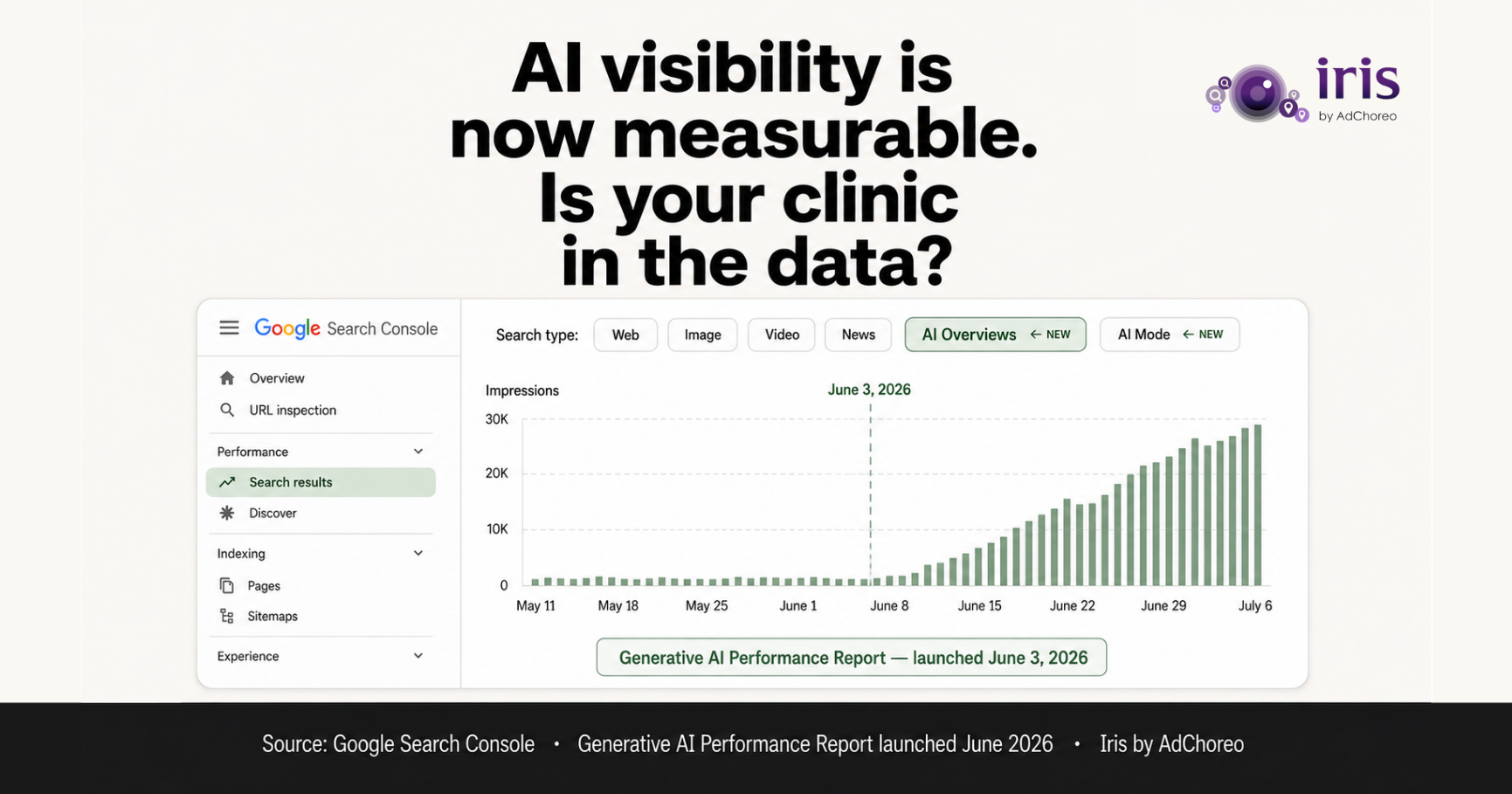
On June 3, 2026, Google added a new section to Google Search Console: the Generative AI Performance Report. For the first time, website owners can see exactly how many times their pages appear in AI-generated search results — AI Overviews and AI Mode — separately from traditional organic search impressions.
For clinic owners, this report is the most important new measurement tool in digital marketing in 2026. It answers a question that was previously impossible to answer: is my clinic actually being cited in AI search results, or is it invisible to the patients who now use AI to choose a doctor?
This guide walks through how to access the report, what the metrics mean, and what to do based on what you find.
If you have Google Search Console access for your clinic's website, the Generative AI report is already available. Here is the step-by-step:
Step 1: Log into Google Search Console at search.google.com/search-console. If your clinic website is not yet in Search Console, add it by claiming ownership through either a DNS record or an HTML meta tag — your developer or web admin can do this in 10-15 minutes.
Step 2: In the left-hand navigation, click "Search Results" under the Performance section.
Step 3: At the top of the Search Results panel, you will see a "Search Type" filter. Click it. You will now see options: Web, Image, Video, News, and — new since June 2026 — "AI Overviews" and "AI Mode" as separate filter options.
Step 4: Select "AI Overviews" first. The data that loads shows impressions, clicks, and click-through rate specifically for times when your clinic's pages appeared in Google AI Overview citations.
Step 5: Repeat with "AI Mode" selected. This shows impressions from Google's conversational AI Mode interface.
Step 6: Set the date range to the last 90 days to establish a baseline.
AI Impressions: The number of times any page on your website was shown as a cited source within a Google AI Overview or AI Mode response. An impression counts whether the patient clicked through to your page or not. Zero AI impressions means your website has never been cited in any AI-generated Google response in that period.
AI Clicks: The number of times a patient clicked through from an AI Overview or AI Mode citation to your website. Typically a small fraction of impressions — patients who receive an AI Overview response often act on the recommendation without clicking through to the source page. A low click-through rate from AI citations is normal and expected.
Average AI Position: Where in the AI-generated response your citation appeared. AI Overviews often cite multiple sources. Position 1 is cited first and most prominently. Lower positions are visible but less prominent.
Queries: The specific patient search queries for which your pages were cited. This is the most actionable metric — it tells you exactly what questions are driving AI citations from your website, and by inference, what other questions you should build content for.
Scenario 1: Zero AI impressions. Your website has not been cited in any Google AI-generated search result in the last 90 days. This is the most common finding for Indian clinic websites. It means either: (a) AI crawlers cannot access your website (robots.txt issue), (b) your website has no schema markup that allows AI to classify your clinic, (c) your content has no directly extractable answer sentences, or (d) some combination of the above. A zero result in the Generative AI report is not a system error — it accurately reflects your clinic's AI search invisibility.
Scenario 2: Low impressions, declining trend. You have some AI impressions, but they are low and falling over the past 90 days. This may indicate that AI systems are finding your content less citable than newer or better-structured content that has appeared from competitors. It is a signal to audit your most-visited pages for AI readability and to add FAQPage schema to your existing FAQ content.
Scenario 3: Growing impressions, specific query clusters. Your AI impressions are growing and concentrated on specific query types — likely related to your highest-volume service pages. This is a positive signal. The action is to identify which service pages are driving citations and build similar content depth for your other service pages.
Scenario 4: Traditional impressions growing, AI impressions flat. Your organic search rankings are strong but your AI impressions are low or zero. This is the common pattern for clinics that have invested in traditional SEO but not in GEO. The AI layer needs separate infrastructure — schema, FAQPage content, AI-readable text — that your traditional SEO work has not addressed.
The Queries tab in the Generative AI report, filtered by AI Overviews or AI Mode, shows you exactly which patient search queries are generating AI citations from your website. This is a direct content roadmap.
If your skin clinic is being cited for "best dermatologist for acne in Koramangala" but not for "laser hair removal clinic Koramangala" — and both are services you offer — it tells you that your acne treatment content has sufficient AI readability but your laser hair removal content does not. You add direct answer content and FAQPage schema to the laser hair removal page. Within 4-6 weeks, the impressions for those queries should appear.
If you have zero queries showing in the Generative AI report, you cannot use this roadmap. You need the foundational infrastructure first — schema, llms.txt, robots.txt correction — before the report can show you which specific content improvements to make.
The Generative AI report in Search Console is best used as a monthly measurement tool. Export the AI Overviews and AI Mode data on the same day each month and track three metrics over time: total AI impressions (growing, flat, or falling), number of distinct queries generating AI citations (breadth of AI visibility), and which specific pages are being cited (which service content is performing).
Iris by AdChoreo tracks these metrics as part of every ongoing engagement and includes them in the monthly performance dashboard alongside traditional search and GBP metrics. For clinic owners managing their own analytics, the report export takes 5 minutes monthly and produces a clean picture of AI visibility trend over time.
Free agentic readiness audit. Scored across all six AI visibility dimensions. No sales call required.
Run Your Free Audit → Over 1,000 independent clinics audited. Average score: 47 out of 100.