Website RebuildTechnical GuideAI VisibilityIndia Clinics
Your Clinic Is Rebuilding Its Website. Here Is Exactly What to Tell Your Developer to Not Lose — And What to Add for AI Visibility.
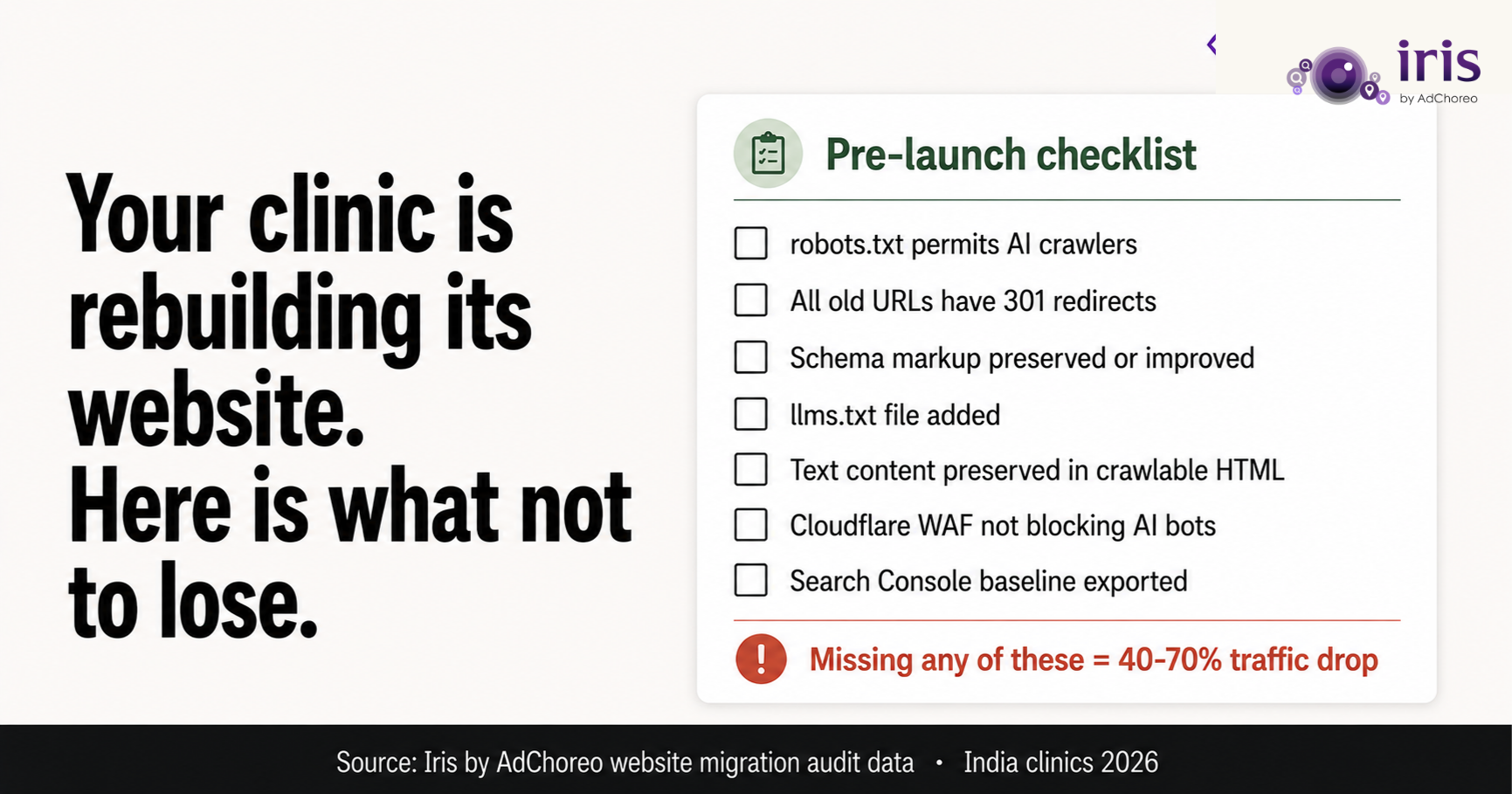
A skin clinic in Mumbai spent eight months building organic search visibility — 47 of 100 on the agentic readiness score, page-one Google rankings for five key procedure queries, a GBP driving 35 calls per month. Then they rebuilt the website. The new site looked better in every way. Within three weeks, organic traffic was down 62%. GBP calls were down to 12 per month. The AI Overview impressions that had started appearing in Search Console dropped to zero.
This is not an unusual outcome. Website rebuilds are the most common single event that destroys clinic search and AI visibility in Indian healthcare. And it is almost always preventable — if the clinic owner knows what to brief the developer to preserve before the rebuild starts.
This is that briefing. Share it with your developer before work starts.
Current URL inventory: Export a complete list of every URL on your current website — all service pages, blog posts, doctor profiles, location pages. Your developer needs this to ensure every URL either migrates to the same address on the new site or has a 301 redirect pointing from the old URL to the new equivalent. Missing redirects are the #1 cause of post-rebuild traffic loss in clinic websites.
Current schema markup: Check your current website for schema markup using the Google Rich Results Test (search.google.com/test/rich-results). Document which schema types exist (MedicalBusiness, FAQPage, LocalBusiness). Make sure the developer knows these exist and are to be preserved — or improved — in the new site. Do not assume the developer will check or knows to check.
Current robots.txt: Go to your-domain.com/robots.txt and copy the contents. Document whether AI crawlers (Google-Extended, ChatGPT-User, PerplexityBot, ClaudeBot) are permitted. Instruct the developer to maintain or improve these permissions in the new robots.txt.
Current Search Console baseline: Export the last 90 days of organic search data from Google Search Console, including the Generative AI Performance Report data. This is your baseline. Compare post-rebuild data against it. If traffic drops, you need the baseline to diagnose why.
Content audit: Identify which pages on your current website generate organic traffic or AI impressions. These are your highest-value content pages and must be preserved verbatim on the new site — not replaced with redesigned versions that lack the text content that was generating rankings.
Share these specific instructions with your developer or agency:
URL preservation: "Every URL that exists on the current website should either exist at the same address on the new website, or have a 301 redirect from the old URL to the new equivalent. Please provide a redirect mapping document before launch."
Schema markup: "The new website must include the following schema types on the specified pages [list them]. The existing schema markup from the current website should be reviewed and preserved or improved. Please provide the JSON-LD schema blocks for review before launch."
Content preservation: "The text content on these specific pages [list them] generates organic search traffic. This content must be preserved verbatim or only improved — not replaced with shorter, image-heavy, or marketing-only versions. If the page design changes, the full text content must still exist in crawlable HTML."
AI crawler access: "The robots.txt file on the new website must explicitly permit the following crawlers: Googlebot, Bingbot, Google-Extended, ChatGPT-User, OAI-SearchBot, PerplexityBot, ClaudeBot. Please show me the robots.txt file before launch."
Cloudflare and security configuration: "If the website will use Cloudflare or any other security/WAF platform, please ensure that Bot Fight Mode and AI crawler blocking are not enabled by default. These settings block legitimate AI crawlers and cause AI search visibility loss."
JavaScript rendering: "Booking forms, service listings, and FAQ content must exist as readable HTML — not solely as JavaScript-rendered components. AI crawlers cannot read JavaScript. Any content that is currently text-based and indexed by Google must remain text-based in the new site."
A rebuild is the ideal time to add AI visibility infrastructure because the developer is already working on the codebase. Adding these elements during a rebuild is significantly more efficient than adding them to an existing site afterwards.
llms.txt file: A plain-text file at your-domain.com/llms.txt providing AI crawlers with a curated content map. Takes a developer 2-3 hours. Should be one of the first deliverables on the new site.
ai-index.json file: At your-domain.com/ai-index.json — a machine-readable entity profile of the clinic. Takes 1-2 developer hours.
Full schema stack: MedicalBusiness or specialty subtype, MedicalProcedure for each service, FAQPage on all Q&A content, Person schema for each practitioner, Speakable on homepage and FAQ sections, BreadcrumbList on all pages. An experienced developer takes 1-2 days to implement the full stack correctly.
AI-readable content structure: Brief your content writer to open every service page with a direct, standalone answer sentence — what the treatment is, who it is for, what it involves. The visual design can surround this with imagery. But the text must be in readable HTML and must open with specificity.
On-domain consultation form: If your current booking capability is embedded from Practo, Justdial, or a third-party platform, the rebuild is the ideal time to add an on-domain consultation form. This makes your booking page indexable and AI-citable.
Submit the new sitemap to Google Search Console immediately after launch. Check the robots.txt via search.google.com/robots.txt tester the day the new site goes live. Check the Rich Results Test for schema validity on the homepage and two service pages on launch day. Monitor Search Console for crawl errors or coverage issues in the first week. Compare organic impressions and AI impressions against the pre-rebuild baseline at 30 days.
If traffic drops significantly in the first two weeks, the most likely causes are missing redirects (check 404s in Search Console) or blocked crawlers (check robots.txt and Cloudflare settings immediately).
Free agentic readiness audit. Scored across all six AI visibility dimensions. No sales call required.
Run Your Free Audit → Over 1,000 independent clinics audited. Average score: 47 out of 100.